

First touch vs last touch attribution is not simply a choice between two competing models—each answers a different marketing question.
That is the wrong decision.
First touch and last touch describe different points in a customer journey. An effective source is something different again: a practical, single-source value selected by an attribution system for operational reporting.
Each can be useful—but only when it answers the question you are actually asking.
This distinction matters because a CRM source field often ends up serving several audiences at once. Marketing wants to know what created demand. Sales wants useful context about the lead. Leadership wants a stable channel report. If one field is expected to answer every question, the report will eventually mislead someone.
This guide explains the three views, their limitations, and a practical way to use them together.
First Touch vs Last Touch Attribution: The Key Difference
| Source view | What it represents | Best question it answers | Main limitation |
|---|---|---|---|
| First touch | The earliest identifiable source recorded for the visitor | Which channels introduce new visitors? | May understate later interactions that helped produce the conversion |
| Last touch | The most recent identifiable source or visit before conversion, depending on the system | What interaction occurred closest to conversion? | Can over-credit closing channels and varies by platform |
| Effective source | The single source selected by a system’s decision rules for operational use | Which source should this lead carry in our working CRM report? | It is rule-based, not an industry-standard attribution model |
The word identifiable is important. A system can record only the journey evidence it receives and retains. Consent choices, cookie deletion, browser changes, cross-device visits, missing parameters, and integration failures can all create gaps.
What is first-touch attribution?
First touch assigns credit to the earliest known marketing interaction in the recorded journey.
Imagine that a visitor first discovers your company through a non-brand Google ad, returns later through an organic search, clicks an email, and then submits a demo form. In a first-touch view, the paid-search interaction receives the credit.
First touch is useful when you want to understand demand creation:
- Which channels introduce people to the business?
- Which campaigns bring new visitors into the funnel?
- Which sources may be undervalued by reports focused only on conversion?
Its limitation is equally clear: the first interaction may not have been sufficient to produce the lead. An email, comparison page, webinar, referral, or sales conversation may have played an important role later.
First touch therefore should not be interpreted as a complete explanation of causality. It is one useful view of the recorded path.
What is last-touch attribution?
Last touch gives credit to the interaction closest to conversion.
Using the same journey, if the visitor clicked an email immediately before submitting the form, email would receive the last-touch credit.
This view can help answer conversion-proximity questions:
- Which channels commonly appear near lead creation?
- Which campaigns bring prospects back when they are ready to act?
- Which landing pages and offers help close the journey?
But “last touch” does not mean exactly the same thing in every platform.
For example, Google Analytics distinguishes user-, session-, and event-scoped traffic dimensions. Its event reporting can use a selected attribution model, while user- and session-scoped dimensions follow their own attribution rules. Google’s paid-and-organic last-click model also ignores Direct when another eligible interaction exists. See Google’s documentation on traffic-source scopes and reporting attribution models.
HubSpot uses different terminology again. Its Original Traffic Source represents the first known web source, while Latest Traffic Source represents the most recent known source. These are contact properties, not universal definitions of first- and last-touch attribution. HubSpot explains the distinction in its traffic-source property documentation.
The practical lesson: before comparing reports, confirm the field’s scope, eligibility rules, identity method, and lookback behavior. Two reports labelled “last touch” may legitimately produce different answers.
What does “effective source” mean?
Effective source is not a standard attribution model shared across analytics and CRM platforms. In AttribuLead, it is the operational source chosen from the journey evidence the plugin has captured.
Its purpose is to provide one stable value when a lead record, export, workflow, or CRM process needs a single source.
For example, suppose a recognized visitor:
- Arrives through a tagged paid-search campaign.
- Leaves without converting.
- Returns four days later by typing the URL or using a bookmark.
- Submits a WordPress form.
The recorded views could be:
- First touch: Paid Search
- Latest visit: Direct
- Effective source: Paid Search, if Source Lock is configured to preserve the earlier identifiable source
The latest visit is still useful journey information. It simply may not be the best value for the CRM’s primary operational source field.
This is the problem Source Lock is designed to address inside AttribuLead. It prevents a source-less return from automatically replacing an earlier qualifying source in the plugin’s effective-source decision.
Source Lock does not rewrite GA4’s traffic-source dimensions or HubSpot’s native Original Traffic Source and Latest Traffic Source properties. It governs AttribuLead’s own attribution data.
A second example: when last touch adds real information
Direct traffic is not the only possible final interaction.
Consider this journey:
- The visitor first arrives through an industry publication.
- Two weeks later, they click a product-comparison email.
- They submit a pricing request during that email session.
Here the views answer genuinely different questions:
- First touch: Referral — the publication introduced the visitor.
- Last touch: Email — the email brought the visitor back immediately before conversion.
- Effective source: Determined by the rules your operational system applies.
There is no universally correct source independent of the reporting question. Referral may be the right answer for acquisition analysis. Email may be the right answer for conversion-path analysis. A stable effective source may be the most useful value for sales routing or a CRM dashboard.
That is why storing the underlying views is better than forcing every team to share one overloaded field.
Is effective source the same as multi-touch attribution?
No.
An effective source is a single-source decision. It selects one value for a lead according to defined rules.
Multi-touch attribution distributes conversion credit across multiple eligible interactions. Depending on the platform and model, credit might be divided using rules or data-driven estimates.
For example:
- 40% to the initial paid-search visit
- 30% to a referral interaction
- 30% to the final email click
An effective-source field cannot represent that distribution. It can make CRM reporting simpler, but simplicity is not the same as multi-touch analysis.
AttribuLead should therefore be described as preserving and selecting lead-level source evidence—not as providing multi-touch modeling.
Which source should your CRM report on?
The most reliable setup is not to choose only one. Preserve separate fields, then use each for its intended job.
Use first touch for acquisition reporting
First touch is the strongest of the three for questions about discovery and demand creation. Use it to compare the earliest known sources of new leads—but remember that “first” means first observed by that system, not necessarily the person’s first-ever exposure to your brand.
Use last touch for conversion-path analysis
Last touch helps reveal the channels and campaigns that commonly occur near conversion. It is valuable for landing-page, nurture, and offer analysis, provided you understand how the reporting platform treats Direct and what counts as an eligible interaction.
Use effective source for operational reporting—when the rule is documented
An effective source can work well as the CRM’s primary operational source when your team needs one stable value for:
- lead routing;
- segmentation;
- sales context;
- workflow enrollment;
- channel summaries;
- attribution-quality checks.
But do not label it “truth” without qualification. It is the result of a documented decision policy applied to the evidence available to the system.
Keep record origin separate
Do not confuse marketing source with the mechanism that created the CRM record.
A contact might have an effective marketing source of Paid Search while its record was created by an integration or form sync. HubSpot explicitly separates traffic source from Record Source, which describes how a record was created. See HubSpot’s Record Source guide.
Your data model should preserve the same conceptual boundary even if your CRM uses different labels.
A practical CRM field structure
If your CRM supports custom properties, use separate fields instead of repeatedly overwriting one generic “Lead Source” value.
| Field | Purpose | Example |
| First-touch source | Earliest known channel | Paid Search |
| First-touch medium | Acquisition detail | CPC |
| First-touch campaign | Earliest known campaign | nonbrand-attribution |
| Last-touch source | Most recent qualifying channel or visit | |
| Last-touch medium | Closing-interaction detail | |
| Effective source | Operational single-source value | Paid Search |
| Effective-source reason | Explains why that value was selected | Earlier source preserved through direct return |
| Record source | How the CRM record was created | WordPress integration |
| Attribution captured at | Audit timestamp | 2026-08-05 14:30 UTC |
Exact fields depend on your CRM and integration. The important principle is to preserve evidence and decision logic separately.
How AttribuLead approaches the three views
AttribuLead is a WordPress marketing-attribution plugin designed to connect captured visitor-source evidence with supported WordPress conversions.
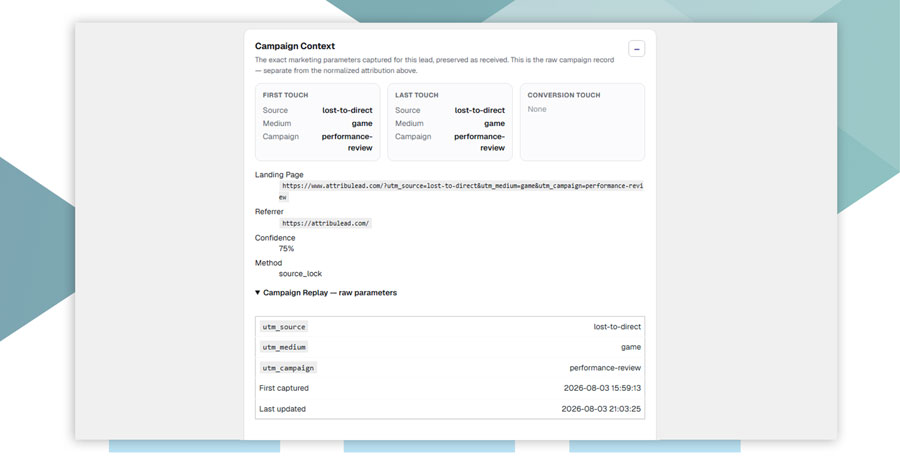
Its lead-level data separates first-touch, last-touch, and effective-source views. Where Source Lock applies, a later direct return can be prevented from replacing an earlier qualifying source in the effective-source field.
This creates two layers of information:
- Observed journey evidence: what AttribuLead recorded as the first and latest relevant touches.
- Operational decision: which source AttribuLead selected as effective, with the reason available in the lead record.
AttribuLead does not change the native attribution logic of GA4 or a CRM. If attribution data is synchronized to HubSpot, it should be treated as a parallel set of AttribuLead properties for custom reporting, lists, and workflows—not as a repair to HubSpot’s built-in traffic-source fields.
Before publication, verify the exact Free/Pro packaging, supported form behavior, export fields, and HubSpot property names against the final release build.
See the reporting problem in 60 seconds
In Lost to Direct, you collect valuable leads and then face the reporting machinery that strips away their context. The game is a playful demonstration; AttribuLead is the WordPress tool designed to preserve the evidence.
Play Lost to Direct → No signup required.
How to test your source reporting
Do not rely on dashboard labels alone. Run a controlled journey and inspect what each system stores.
- Open a private browser window and accept the consent option required for your intended test.
- Visit a tagged test URL, such as
?utm_source=test-search&utm_medium=cpc&utm_campaign=source-model-test. - Confirm that the visit appears in the relevant attribution system.
- Close the window or end the session according to the tool’s rules.
- Return without campaign parameters using the same browser identity.
- Submit a supported test form with a unique test email address.
- Compare the first-touch, last-touch, effective-source, and reason fields in AttribuLead.
- If a CRM sync is enabled, compare AttribuLead’s dedicated properties with the CRM’s native traffic-source and record-source fields.
- Repeat with a new identifiable final source—such as a tagged email URL—to confirm how the latest and effective values change.
Document the expected outcome before the test. Otherwise, it is easy to mistake a difference in scope for a tracking failure.
Common reporting mistakes
Calling the first observed source the customer’s true first touch
The system may not have seen earlier offline, cross-device, cookieless, or pre-consent interactions. Use “first known” or “first recorded” when precision matters.
Assuming Direct always receives last-click credit
Some platforms ignore Direct in specific attribution reports when another eligible interaction exists. A session report, a conversion report, and a CRM property may still tell different stories.
Treating effective source as an objective fact
Effective source is a policy outcome. Make the selection rules and reason visible so stakeholders can understand why the value was chosen.
Overwriting evidence
If a CRM stores only one mutable source field, you lose the ability to audit how that value changed. Preserve first, latest, effective, and record-origin fields separately where possible.
Mixing lead attribution with revenue attribution
A lead-source field answers who or what created a lead record under a defined rule. Revenue attribution introduces orders, customers, refunds, repeat purchases, and potentially different attribution windows. Do not assume the same field answers both questions automatically.
The answer: report more than one view
There is no universal winner in first-touch versus last-touch attribution.
- Use first touch to study acquisition and demand creation.
- Use last touch to study interactions close to conversion.
- Use a documented effective source when operational workflows require one stable lead-source value.
- Keep record source separate from marketing source.
For a CRM’s main working source field, AttribuLead’s effective source can be the most practical default—especially when Source Lock prevents an unattributed direct return from displacing an earlier identifiable source. But the underlying first- and last-touch fields should remain available for analysis and QA.
The goal is not to find one label that answers every attribution question. It is to preserve enough evidence that each team can ask the right question without rewriting the history of the lead.
Explore AttribuLead or download AttribuLead Free to test first-touch, last-touch, and effective-source reporting on your WordPress site.
Frequently asked questions
Neither is universally better. First touch is more useful for analyzing initial acquisition; last touch is more useful for examining interactions close to conversion. The right view depends on the question and the platform’s attribution rules.
No. In AttribuLead, effective source is an operational value selected from recorded attribution evidence according to the plugin’s rules. Other products may not use the term or may define it differently.
Not necessarily. A latest direct return can remain visible as the last visit while Source Lock preserves an earlier qualifying source as AttribuLead’s effective source.
No. Effective source selects one source. Multi-touch attribution distributes credit across multiple interactions.
Store separate first-touch, last-touch, effective-source, and record-source fields where possible. If an operational workflow requires one primary marketing-source value, use a documented effective-source rule and retain the supporting fields for auditability.
The systems may use different identities, scopes, attribution models, consent states, eligibility rules, and lookback windows. Compare field definitions before treating the difference as an error.
AttribuLead should be positioned as supplying its own attribution properties. It does not change HubSpot’s native attribution logic or automatically repair HubSpot’s standard traffic-source reports.